
Teams and chat · for your colleagues
No one has to ask around.
Answers in seconds.
Colleagues ask in the chat, in Teams or forward an email. The answer comes from your own systems and documents, with the source, and can be emailed on to the customer or become a ticket.


Three ways to ask
Where
your colleagues
already work.
The same answer, the same sources, wherever the question is asked.
In the Gaide app, in the browser and on your phone.
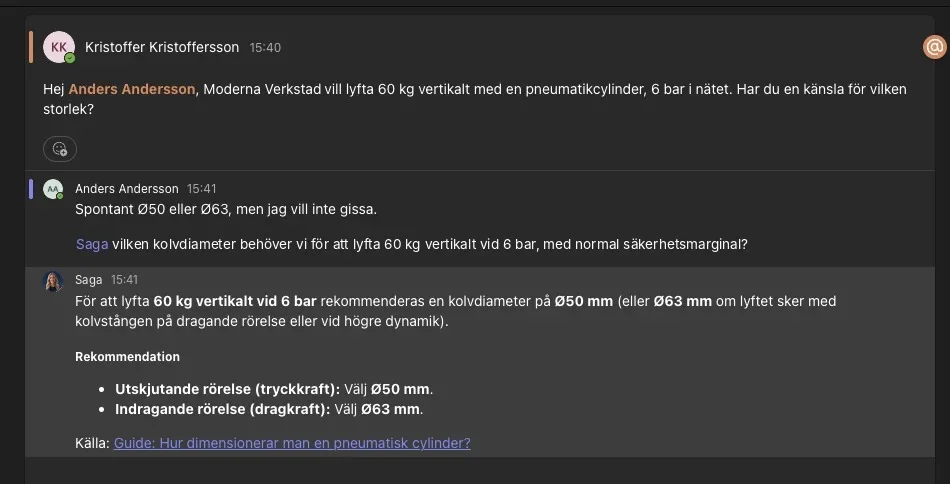
In the chat.
Ask as you would a colleague. The answer comes with the source, and can become an email, a quote or a ticket straight from the chat.
In Teams.
If you work in Teams, Saga answers there: @Saga in the channel or directly to her. The same answer, the same sources.

Forward it, the answer comes back.
By email.
Forward the customer’s email to Saga. The answer comes back in your inbox in seconds, with the source, ready to send on. Works from your email address without any integration.
Examples
Answers that
combine your sources.
Not “find the file”. Model year, replacement list, stock and contract price in the same answer, without it getting complicated.
Result: Quote draft ready at 14:21. The salesperson approves and sends.
Result: The answer in Teams in seconds. The technician finishes the job on site.
Result: The enquiry to the supplier as a draft, ready to send.
The Foundation
The right answer every time,
from your own systems.
We connect your systems and documents to the Foundation and keep it up to date. Whoever asks gets an answer from what they are allowed to see.

 SharePoint
 Teams
 Copilot
 ChatGPT
 Claude
Live
At Cromocol.
Service technicians and customer service at Cromocol ask instead of calling the office.

“On some machines they have historically had to call the office and ask someone to leaf through old folders. Now it takes a quick question, and the answer comes straight away.”
 Andreas Hagberg
CEO, Cromocol · part of the Ernström Group
FILM · ANDREAS ON THE CHAT
Getting started
Live in days.
We listen to which questions take time at your company and set up the flow for your colleagues. We adapt name, image and tone to you.
A 30-minute call.
You tell us which questions go to the person who knows the most. We show how Saga answers them.
We set her up on your data.
Documents, SharePoint and your ERP in the Foundation, with your permissions. We go through your real questions together and correct the answers.
Live for all your colleagues, and we stay with you all the way.
In the chat, in Teams and by email. We follow the questions, check in every month and take the next step when you are ready.
If you want Saga inside Copilot, ChatGPT or Claude, it is an add-on. Get in touch and we will tell you more.
Contact us

See how she would
answer your questions.
30 minutes with Martin. You tell us which questions get stuck at your company, we show what it can look like on your own data.
 Martin Helgesson
Chief Commercial Officer (CCO)
Frequently asked questions
We already have Copilot. Do we need this?
Keep Copilot. Saga knows your products, your prices and your history, with a source on every answer. If you want her inside Copilot, it is an add-on, get in touch and we will tell you more.
Who sees what?
She follows your permissions. Everyone gets answers from what they are allowed to see.
How do we know the answers are correct?
Every answer shows the source. Saga answers from your own material, and if the answer is missing she says so.
Can she be called something other than Saga?
Yes. You can call her Saga, or give her a name, an image and a tone of your own. We help you choose.
Does it cost per user?
No. The price is a monthly cost that depends on the parts and the flows. All your people, all questions and all support included.
Do we need IT to get started?
Not for Teams and chat. We need a contact person who knows your day-to-day. The systems are connected when you want.